Analysis#
The Analysis page provides a code editor specifically for analyzing previously acquired data, without performing new data acquisition.
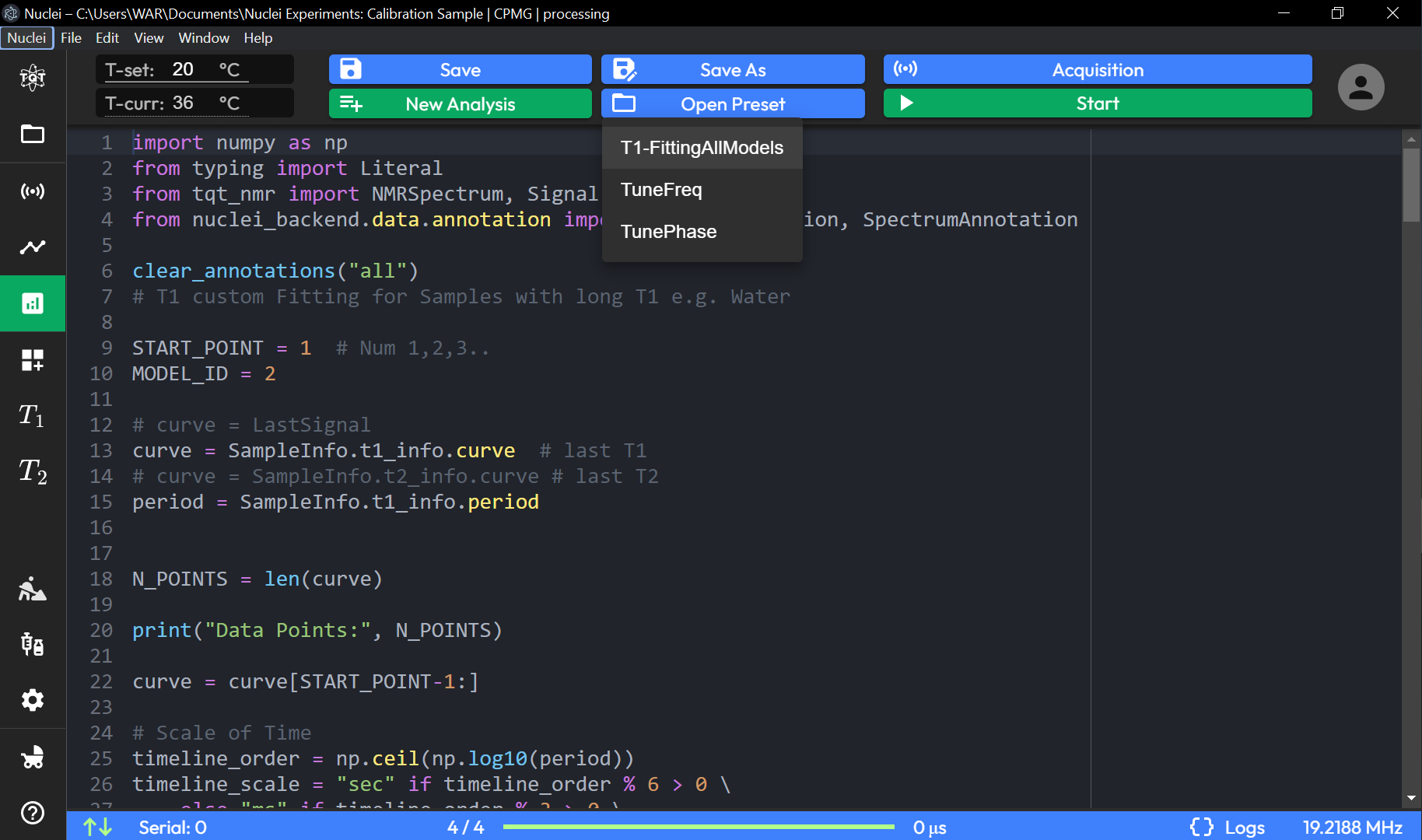
Code Editor (Analysis Script)#
-
Script-Based Analysis: The code editor allows users to write or modify scripts for analyzing captured data, such as fitting or processing NMR signals.
-
Users can import necessary libraries and modules, like
numpy,NMRSpectrum, andSignalAnnotation, to facilitate data analysis. -
The script can include parameters like:
-
START_POINT: Specifies the starting point for analysis, allowing users to select specific data segments.
- MODEL_ID: Identifies the model used for fitting or analysis, enabling customized fitting algorithms.
- Internal and External function calls (for further information see API Reference).
Analysis-Specific Functions#
-
Data Access: The script can retrieve data from specific variables, such as
SampleInfo.t1_info.curve, which represents the curve for T1 analysis. -
Data Manipulation: Users can process data by specifying variables and modifying data points within the script, such as scaling time or adjusting the number of data points.
-
Annotation Functions: Provides options for clearing or adding annotations (e.g.,
clear_annotations("all")) to the analysis graph for improved data interpretation.
Control Options#
-
Save, Save As, Save Preset: Options to save the current analysis script, either by overwriting, saving as a new file, or saving as a preset for future use.
-
New, Open, Open Preset: Allows creating a new analysis script or opening an existing one, including presets for quick access.
-
Acquisition (Disabled): The acquisition button is available but intended only for switching between modes, as new data acquisition does not occur on this page.
-
Start (Playback): Initiates the execution of the analysis script on the loaded dataset.
The Analysis page enables users to execute custom analysis scripts on previously captured data, facilitating detailed examination and processing without requiring re-acquisition. It's ideal for users who wish to perform data fitting, modeling, or specific signal evaluations post-capture.
Preset Examples#
See following example of the possible logic that could be executed at this Page.
Tune Frequency Analysis Preset#
# ----------- Settings -----------

ACQ_TIME = 3000

SEQUENCE = [
    Pulse("x+", 3.6),
    Silence(11),
    ADC(ACQ_TIME)
]

# ----------- Tune -----------

_, spectrum = run_sequence(SEQUENCE)

shift_mhz = spectrum.frequencies[spectrum.amplitudes.real.argmax()]
shift_hz = shift_mhz / 1e6

tuned_freq = DeviceSettings.frequency + shift_hz
print("New Frequency:", tuned_freq)

DeviceSettings.frequency = tuned_freq
Tune Phase Analysis Preset#
import numpy as np
from tqt_nmr import Signal

# ----------- Settings -----------

NUM_STEPS = 50

ECHO_TIME = 200
RING_TIME = 11
START_SLEEP = 2

BASE_PHASE = 90.0
MAX_PHASE_ANGLE = 360

SEQUENCE = [
    Silence(START_SLEEP),
    Pulse("x+", DeviceSettings.p90_us),
    Silence(RING_TIME),
    ADC(ECHO_TIME),
    Silence(START_SLEEP),
]

# ----------- Single Iteration -----------

def tune_iteration(phase_angle: float) -> tuple[float, float]:
    DeviceSettings.phase_deg = phase_angle

    acq_start_time = START_SLEEP + RING_TIME + DeviceSettings.p90_us
    signal, _ = run_sequence(SEQUENCE, seq_null=acq_start_time)

    mean_real = -np.mean(signal.amplitudes[4:11].real)
    mean_imag = -np.mean(signal.amplitudes[4:11].imag)

    return mean_real, mean_imag

# ----------- Full Process -----------

phase_angles = np.linspace(0, MAX_PHASE_ANGLE, NUM_STEPS)
amplitudes = []

for i, phase_angle in enumerate(phase_angles):
    print(f"{i + 1} / {len(phase_angles)}")
    mean_real, mean_imag = tune_iteration(phase_angle)

    amplitudes.append(mean_real + 1j * mean_imag)

    plot(Signal(phase_angles[: i + 1], np.array(amplitudes)))

opt_phase = phase_angles[np.array(amplitudes).real.argmax()]
print('Optimal Phase [deg]:', opt_phase)

DeviceSettings.phase_deg = opt_phase
List of external libraries possible to import#
- beautifulsoup4==4.12.3
- cryptography==41.0.7
- Flask==3.0.2
- ipython==8.28.0
- Jinja2==3.1.4
- jsonschema==4.17.3
- matplotlib==3.9.2
- nmrglue==0.9
- numpy==1.26.4
- pandas==2.2.3
- pySB45 @ git@github.com:TerraQuanTech/SB45
- scipy==1.13.0
- SQLAlchemy==2.0.35
- tqt_nmr @ git@github.com:TerraQuanTech/tqt_nmr
- websockets==12.0
- etc